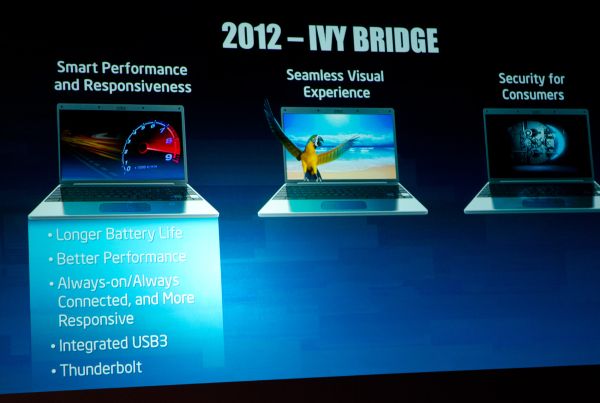
The upcoming Ivy Bridge's 7-series will feature the USB 3.0 and Anandtech reported that the Thunderbolt will be also integrated to Intel's next generation of processor this coming 2012.Currently Thunderbolt is available to Apple 2011 Macs.
Showing posts with label Hardware. Show all posts
Tuesday, May 31, 2011
Intel integrates both USB 3.0 and Thunderbolt to Ivy Bridge
The upcoming Ivy Bridge's 7-series will feature the USB 3.0 and Anandtech reported that the Thunderbolt will be also integrated to Intel's next generation of processor this coming 2012.Currently Thunderbolt is available to Apple 2011 Macs.
Wednesday, May 25, 2011
Google - the world's fourth largest computer maker
Google is not just the world's largest search engine but the world's fourth largest computer manufacturer after Dell, HP, and IBM, according to Martin Reynolds, an analyst with the Gartner Group.
Google makes their own computer servers typically because they need customized server for their own needs.
According to Wikipedia: Google Platform;
Google makes their own computer servers typically because they need customized server for their own needs.
According to Wikipedia: Google Platform;
Though the numbers are not publicly known, some people estimate that Google maintains over 450,000 servers, arranged in racks located in clusters in cities around the world, with major centers in Mountain View, California; Council Bluffs, Iowa; Herndon, Virginia; Lenoir, North Carolina; Atlanta, Georgia; Dublin, Ireland; Saint-Ghislain, Belgium; Zürich, Switzerland; Tokyo, Japan; Beijing, China; …Racks are custom-made and contain 40 to 80 servers…
Servers are commodity-class x86 PCs running customized versions of Linux. The goal is to purchase CPU generations that offer the best performance per dollar, not absolute performance. Estimates of the power required for over 450,000 servers range upwards of 20 megawatts, which cost on the order of US$2 million per month in electricity charges.
Take a tour to Google Datacenter:
Tuesday, May 10, 2011
HP Elite L2201x price and specs
HP unveiled products today and one of the eye catcher is the HP Elite L2201x LED-Backlit 22 inch Monitor. With HD resolution of 1920x1080 pixels and with .4inch thick. The power consumption at 28watch this display is a power saver. It weighs around 3.3Kg, and working at 100 to 240 VAC, 50 or 60 Hz.
The HP Elite L2201x price is $250.
Thursday, April 28, 2011
SONY VAIO - 'Freestyle Hybrid PC' and 'Ultimate Mobile PC'
IT Mobile Meeting in Tokyo - After Sony Tablet S1 and S2, Sony showcased their new upcoming Vaio Laptops. The SonyVaio 'Freestyle Hybrid PC' and Vaio'Ultimate Mobile PC'.
The Sony Vaio 'Freestyle Hybrid PC' is a a combination of a Tablet and a Netbook. It has a slider keyboard to use as a fully functional Netbook.
While the Vaio 'Ultimate Mobile PC' is a lightweight and thin laptop. The specs for both machine is not know yet. I guess SONY likes to teas us.
The Sony Vaio 'Freestyle Hybrid PC' is a a combination of a Tablet and a Netbook. It has a slider keyboard to use as a fully functional Netbook.
While the Vaio 'Ultimate Mobile PC' is a lightweight and thin laptop. The specs for both machine is not know yet. I guess SONY likes to teas us.
Tuesday, April 5, 2011
DELL Inspiron N4010 Driver - does not support XP
DELL Inspiron N4010 drivers: "DELL Inspiron N4010 is the latest model of the Inspiron Family. There are three models the Inspiron N4010, Inspiron N5010 and Inspiron N7010..."
Monday, March 28, 2011
AMD Challenges Nvidia - HD6990 vs GTX590
Few weeks back both AMD and Nvidia released their flagship videocards both claiming to be the fastest video card to date. AMD released their dual-Cayman GPU powered AMD Radeon HD 6990 and Nvidia released the dual-GF110 GPU powered NVIDIA GeForce GTX 590 putting current High-End GPU behind.
In a press release issued by Nvidia claiming that the Nvidia GTX 590 is worlds fastest video card, SANTA CLARA, CA--(Marketwire - March 24, 2011) - NVIDIA today introduced the GeForce® GTX® 590, the fastest dual graphics card available today which also happens to be the world's quietest too. Powered by dual NVIDIA Fermi™-class GPUs on a single card, the GTX 590 is designed for über enthusiasts and those looking to build the ultimate PC gaming rig.
AMD took a stand and challenge Nvidia for the claim of who has the fastest. In their official AMD Blog Dave Erskine wrote challenging Nvidia for the claim.
![]() |
| NVIDIA Says The GeForce GTX 590 Is 'The World's Fastest Graphics Card" |
“Yesterday our competitor also issued a press release, announcing the launch of what they claim to be the “World’s Fastest Graphics Card”– the Nvidia GTX 590. We combed through their announcement to understand how it was that such a claim could be made and why there was no substantiation based on industry-standard benchmarks, similar to what AMD did with industry benchmark 3DMark 11, the latest DirectX 11 benchmark from FutureMark.” - AMD Blog
This two mammoth videocards set new standards and benchmark records in gaming and videocard performance. There is no doubt that competition is intense to both manufacturers and grabbing the spot means more people will choice over the other. I will follow this challenge closely if Nvidia will react. This gonna be fun weekend.
So a simple question, which one will you choice?
via: HotHardware
Thursday, March 17, 2011
AMD Bulldozer - the answer to Intel Sandy Bridge?
The latest AMD architecture designed from the ground up codename BULLDOZER maybe the answer of AMD to Intel's i7 "Sandy Bridge". At preset AMD has no processor that can go toe-to-toe with Core i7 especially the new build Sandy Bridge.
The new AMD "Zambezi" is a 32nm multi-threaded high performance x86 processor with 4, 6, and 8 cores variants based on the BULLDOZER architecture. Features are AMD's TurboCore 2.0 technology, over-clocked cores, dual graphics, OpenCL and GPU capabilities. Making this new CPU an integrated chip than a normal desktop CPU. This Zambezi is belong to the FX family where few years back AMDs high-end CPU.
AMD is hoping to gain market share after the manufacturing error found on Intel Sandy Bridge. Currently Intel holds 80.8 percent of the market share with 0.4 increase and AMD has 19.9% with 0.4 decrease.
Personal thought:
If AMD "Zambezi" belongs to FX Family I am just hoping that AMD will not price this much. The AMD FX "Sledge Hammer" back in 2003 cost around $1000 due to the high cost it did nothit the market plus Intel released the Core 2 Duo which was much faster and cheaper.
The 4, 6 and 8 variants will give the consumer a good choice, and Quad-Core system nowadays is the norm desktop computing.
[via]Physorg
The new AMD "Zambezi" is a 32nm multi-threaded high performance x86 processor with 4, 6, and 8 cores variants based on the BULLDOZER architecture. Features are AMD's TurboCore 2.0 technology, over-clocked cores, dual graphics, OpenCL and GPU capabilities. Making this new CPU an integrated chip than a normal desktop CPU. This Zambezi is belong to the FX family where few years back AMDs high-end CPU.
AMD’s Zambezi chip will feature eight processing engines with its cores packed into four modules. The Bulldozer architecture includes two integer units, along with one floating-point unit and two threads on separate integer units instead of the single-core solution.
Based on the diagram AMD intends to dramatically improve multithreading performance of its CPUs: two INT schedulers, an FP scheduler and separate data caches for each of four cores. Credit: AMD
AMD is hoping to gain market share after the manufacturing error found on Intel Sandy Bridge. Currently Intel holds 80.8 percent of the market share with 0.4 increase and AMD has 19.9% with 0.4 decrease.
Personal thought:
If AMD "Zambezi" belongs to FX Family I am just hoping that AMD will not price this much. The AMD FX "Sledge Hammer" back in 2003 cost around $1000 due to the high cost it did nothit the market plus Intel released the Core 2 Duo which was much faster and cheaper.
The 4, 6 and 8 variants will give the consumer a good choice, and Quad-Core system nowadays is the norm desktop computing.
[via]Physorg
Wednesday, March 9, 2011
ASUS O! Play Mini - price and specs
Asus O! Play Mini is the first media player to take advantage of USB 3.0. This is one of slimmest media player with 151.85mm x 106.7mm x 29.03 mm but don't get wrong it can play anything you can through at it.
The front side has two readers one is a USB 2.0 and one for SD Card. At the back is for the connectors an HDMI 1.3 that delivers 1080p and 7.1 audio in Dolby Digital AC3, DTS 2.0+, even TrueHD and DTS-HD, plus a variety of other formats. There are also RCA outputs if you prefer your digital steam in audio.
O! Mini File Format Support:
Video : MPEG1,MPEG2,MPEG4,RM,RMVB,VC-1,H.264
Video File Extension : TRP,MP4,MOV,XVID,AVI,ASF,WMV,MKV,RMVB 720p,RMVB 1080p,FLV,TS,MTS,M2TS,DAT,MPG,VOB,ISO,IFO,M1V,M2V,M4V
ASUS O! Play Mini price is Php 3,900.00 at Rsun.com.ph
Saturday, March 28, 2009
USB Tracking
Well, it is been awhile since I updated this blog of mine. I was thinking if I will continue writing and will stick to blogspot. And, also there are too many tech bloggers out there with much time to write. I hope I will have the now the time to write.
With the advent of USB thumb drive and removable media, because of the small capacity of floppy drive this devices took over, this is very useful in transferring files such as music, movies, office documents. But behind every technology there is a dark side. In corporate world, top secret projects are well guarded but how you will guard your data to thieves? Even in your office, home,etc...If they can plug a nail size memory stick to your computer and get everything they want?
Here is a guide in USB Tracking, you can get the log of any USB device attached to your system. Each USB thumb drive has a unique serial number and windows will store it in the registry. I only tested this on my XP box. Surely it'll work on Vista, Windows 7 and Win98.
Q.Where this USB tracking use to? This is a little example of a computer forensics.
A-1.If you want to get the serial number of your thumb drive and record it. Personally, I created a small program that tells who's the owner of the thumb drive, my name, mobile number, serial number of the device as a proof that I am the rightful owner I put it my a secret partition with password protect and in my unsecured partition. If ever I lost it, and someone finds it, if ever he/she has a good heart, they can contact me because of that information and i can prove it because I have the serial number of the device.
A-2.If you are in doubt if someone is stealing the contents of your computer, though he/she needs to physically plug the device to your unit. In this you will able to check if there is an unknown flash drive was plugged into.
A-3. After you get all the information above such as serial number, you can also get the last read/write of the USB thumb drive which I think is the most important part of the whole investigation. If you are a Network Administrator, and have a logging system, you will know who logged in that specific time, thus knowing who's stealing infomation.
Lets start:
We don't need special tool on this, everyone's favorite, the REGEDIT, fire up Start > Run > Regedit
Navigate to this:
\HKEY_LOCAL_MACHINE\SYSTEM\Controlset001\Enum\USBTOR

In this you will able to see the attached devices, navigating to one of the device you will get the serial number which is unique to each device.

Just copy the serial number, now it's time to get the read/write entry of the selected device.
Go to:
I will use my thumb drive's serial number - "0019B931D970C8C155DB05A5&0"
After finding the entry, export it as a clear text;

Here what I got:
Key Name: HKEY_LOCAL_MACHINE\SYSTEM\CurrentControlSet\Control\DeviceClasses\{53f56307-b6bf-11d0-94f2-00a0c91efb8b}\##?#USBSTOR#Disk&Ven_Kingston&Prod_DataTraveler_2.0&Rev_1.00#0019B931D970C8C155DB05A5&0#{53f56307-b6bf-11d0-94f2-00a0c91efb8b}
Class Name:
Last Write Time: 3/26/2009 - 12:52 PM
Value 0
Name: DeviceInstance
Type: REG_SZ
Data: USBSTOR\Disk&Ven_Kingston&Prod_DataTraveler_2.0&Rev_1.00\0019B931D970C8C155DB05A5&0
Key Name: HKEY_LOCAL_MACHINE\SYSTEM\CurrentControlSet\Control\DeviceClasses\{53f56307-b6bf-11d0-94f2-00a0c91efb8b}\##?#USBSTOR#Disk&Ven_Kingston&Prod_DataTraveler_2.0&Rev_1.00#0019B931D970C8C155DB05A5&0#{53f56307-b6bf-11d0-94f2-00a0c91efb8b}\#
Class Name:
Last Write Time: 3/26/2009 - 12:52 PM
Value 0
Name: SymbolicLink
Type: REG_SZ
Data: \\?\USBSTOR#Disk&Ven_Kingston&Prod_DataTraveler_2.0&Rev_1.00#0019B931D970C8C155DB05A5&0#{53f56307-b6bf-11d0-94f2-00a0c91efb8b}
Key Name: HKEY_LOCAL_MACHINE\SYSTEM\CurrentControlSet\Control\DeviceClasses\{53f56307-b6bf-11d0-94f2-00a0c91efb8b}\##?#USBSTOR#Disk&Ven_Kingston&Prod_DataTraveler_2.0&Rev_1.00#0019B931D970C8C155DB05A5&0#{53f56307-b6bf-11d0-94f2-00a0c91efb8b}\#\Control
Class Name:
Last Write Time: 3/26/2009 - 5:04 PM
Value 0
Name: Linked
Type: REG_DWORD
Data: 0x0
Key Name: HKEY_LOCAL_MACHINE\SYSTEM\CurrentControlSet\Control\DeviceClasses\{53f56307-b6bf-11d0-94f2-00a0c91efb8b}\##?#USBSTOR#Disk&Ven_Kingston&Prod_DataTraveler_2.0&Rev_1.00#0019B931D970C8C155DB05A5&0#{53f56307-b6bf-11d0-94f2-00a0c91efb8b}\Control
Class Name:
Last Write Time: 3/26/2009 - 5:04 PM
Value 0
Name: ReferenceCount
Type: REG_DWORD
Data: 0x0
Now I am able to get the last write to the device.
Mounted Devices: Contains all the drive letter being used by the mounted devices such as thumb drive, external hard drive,
Registry Entry: \HKEY_LOCAL_MACHINE\SYSTEM\MountedDevices
Conclusion: In this tutorial you will able to get the serial number of your USB device, use the serial number to retrieve the information about the last write.
Forgive me if I have some typo or anything, just feel free to comment
And lastly I would like to give credit to Harlen , I forgot his last name for the great book, Windows Forensics...
With the advent of USB thumb drive and removable media, because of the small capacity of floppy drive this devices took over, this is very useful in transferring files such as music, movies, office documents. But behind every technology there is a dark side. In corporate world, top secret projects are well guarded but how you will guard your data to thieves? Even in your office, home,etc...If they can plug a nail size memory stick to your computer and get everything they want?
Here is a guide in USB Tracking, you can get the log of any USB device attached to your system. Each USB thumb drive has a unique serial number and windows will store it in the registry. I only tested this on my XP box. Surely it'll work on Vista, Windows 7 and Win98.
Q.Where this USB tracking use to? This is a little example of a computer forensics.
A-1.If you want to get the serial number of your thumb drive and record it. Personally, I created a small program that tells who's the owner of the thumb drive, my name, mobile number, serial number of the device as a proof that I am the rightful owner I put it my a secret partition with password protect and in my unsecured partition. If ever I lost it, and someone finds it, if ever he/she has a good heart, they can contact me because of that information and i can prove it because I have the serial number of the device.
A-2.If you are in doubt if someone is stealing the contents of your computer, though he/she needs to physically plug the device to your unit. In this you will able to check if there is an unknown flash drive was plugged into.
A-3. After you get all the information above such as serial number, you can also get the last read/write of the USB thumb drive which I think is the most important part of the whole investigation. If you are a Network Administrator, and have a logging system, you will know who logged in that specific time, thus knowing who's stealing infomation.
Lets start:
We don't need special tool on this, everyone's favorite, the REGEDIT, fire up Start > Run > Regedit
Navigate to this:
\HKEY_LOCAL_MACHINE\SYSTEM\Controlset001\Enum\USBTOR

In this you will able to see the attached devices, navigating to one of the device you will get the serial number which is unique to each device.

Just copy the serial number, now it's time to get the read/write entry of the selected device.
Go to:
\HKEY_LOCAL_MACHINE\SYSTEM\Controlset001\Controls\deviceclass- in this entry you will now get the read and write log.
I will use my thumb drive's serial number - "0019B931D970C8C155DB05A5&0"
After finding the entry, export it as a clear text;

Here what I got:
Key Name: HKEY_LOCAL_MACHINE\SYSTEM\CurrentControlSet\Control\DeviceClasses\{53f56307-b6bf-11d0-94f2-00a0c91efb8b}\##?#USBSTOR#Disk&Ven_Kingston&Prod_DataTraveler_2.0&Rev_1.00#0019B931D970C8C155DB05A5&0#{53f56307-b6bf-11d0-94f2-00a0c91efb8b}
Class Name:
Last Write Time: 3/26/2009 - 12:52 PM
Value 0
Name: DeviceInstance
Type: REG_SZ
Data: USBSTOR\Disk&Ven_Kingston&Prod_DataTraveler_2.0&Rev_1.00\0019B931D970C8C155DB05A5&0
Key Name: HKEY_LOCAL_MACHINE\SYSTEM\CurrentControlSet\Control\DeviceClasses\{53f56307-b6bf-11d0-94f2-00a0c91efb8b}\##?#USBSTOR#Disk&Ven_Kingston&Prod_DataTraveler_2.0&Rev_1.00#0019B931D970C8C155DB05A5&0#{53f56307-b6bf-11d0-94f2-00a0c91efb8b}\#
Class Name:
Last Write Time: 3/26/2009 - 12:52 PM
Value 0
Name: SymbolicLink
Type: REG_SZ
Data: \\?\USBSTOR#Disk&Ven_Kingston&Prod_DataTraveler_2.0&Rev_1.00#0019B931D970C8C155DB05A5&0#{53f56307-b6bf-11d0-94f2-00a0c91efb8b}
Key Name: HKEY_LOCAL_MACHINE\SYSTEM\CurrentControlSet\Control\DeviceClasses\{53f56307-b6bf-11d0-94f2-00a0c91efb8b}\##?#USBSTOR#Disk&Ven_Kingston&Prod_DataTraveler_2.0&Rev_1.00#0019B931D970C8C155DB05A5&0#{53f56307-b6bf-11d0-94f2-00a0c91efb8b}\#\Control
Class Name:
Last Write Time: 3/26/2009 - 5:04 PM
Value 0
Name: Linked
Type: REG_DWORD
Data: 0x0
Key Name: HKEY_LOCAL_MACHINE\SYSTEM\CurrentControlSet\Control\DeviceClasses\{53f56307-b6bf-11d0-94f2-00a0c91efb8b}\##?#USBSTOR#Disk&Ven_Kingston&Prod_DataTraveler_2.0&Rev_1.00#0019B931D970C8C155DB05A5&0#{53f56307-b6bf-11d0-94f2-00a0c91efb8b}\Control
Class Name:
Last Write Time: 3/26/2009 - 5:04 PM
Value 0
Name: ReferenceCount
Type: REG_DWORD
Data: 0x0
Now I am able to get the last write to the device.
Mounted Devices: Contains all the drive letter being used by the mounted devices such as thumb drive, external hard drive,
Registry Entry: \HKEY_LOCAL_MACHINE\SYSTEM\MountedDevices
Conclusion: In this tutorial you will able to get the serial number of your USB device, use the serial number to retrieve the information about the last write.
Forgive me if I have some typo or anything, just feel free to comment
And lastly I would like to give credit to Harlen , I forgot his last name for the great book, Windows Forensics...
Subscribe to:
Posts (Atom)